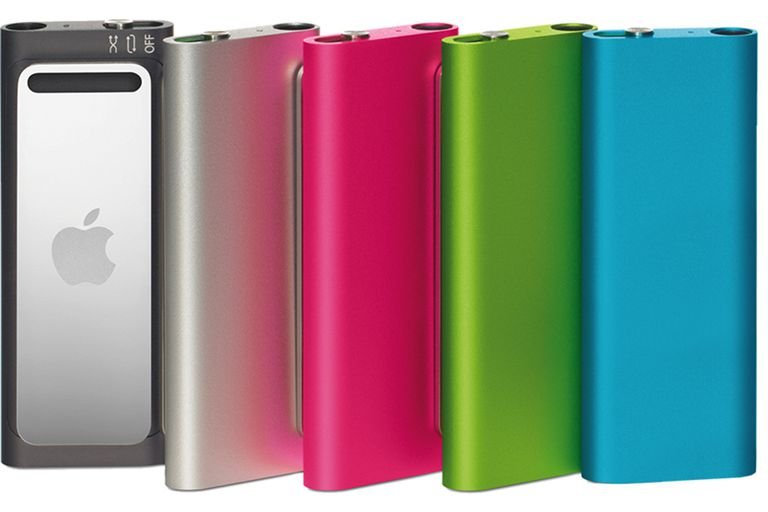
The iPod Shuffle 3rd Generation redefined minimalism, pushing the boundaries of what a music player could be. Launched in March 2009, this iteration of Apple's smallest iPod model wasn't just "jaw-droppingly small" — it introduced an entirely new way of interacting with your music, making the the iPod Shuffle 3rd generation a standout, if sometimes polarizing, device in the storied iPod lineage. It eschewed on-device buttons almost entirely, famously relying on a speaking voice and in-line headphone controls to manage your tunes. This comprehensive overview dives into its design, unique features, and the lasting impact of its innovative, albeit challenging, user experience.
At a Glance: iPod Shuffle 3rd Generation
- Radical Design: Unbelievably tiny, measuring just 45.2 x 17.5 x 7.8 mm, made of brushed aluminum with a polished steel clip.
- No On-Device Controls: All playback, volume, and playlist management were moved to a three-button remote on the bundled headphone cord.
- VoiceOver Introduced: Pioneering text-to-speech technology spoke song, artist, album, and playlist names in 20 languages.
- Multiple Playlist Support: A significant upgrade, allowing users to switch between different playlists on the go.
- Connectivity: Still required a specific cable for USB connection and charging via the headphone jack.
- Initial Third-Party Headphone Issues: The reliance on a proprietary Apple chip in the headphone remote meant standard headphones were initially incompatible for control.
- Capacities: Initially 4GB, later joined by a 2GB model, with a special polished stainless steel 4GB version available through the Apple Store.
A Radical Redesign: Shrinking the Shuffle to its Core
When Apple unveiled the 3rd Generation iPod Shuffle, its physical dimensions were the first thing to grab attention. Apple boldly touted it as "the first music player that talks to you" — but before it spoke, it stunned with its size. At a mere 45.2 mm tall, 17.5 mm wide, and a svelte 7.8 mm thin, it was less than half the size of the 2nd generation, earning its "jaw-droppingly small" moniker.
Crafted from sleek, brushed aluminum, the 3rd gen Shuffle initially came in classic silver and, for the first time in the Shuffle's history, a sophisticated black. A polished steel attachment clip completed its minimalist aesthetic, designed to seamlessly blend into clothing without drawing undue attention. This design philosophy wasn't just about making it small; it was about making it disappear, leaving only the music. The physical "on/off/shuffle" switch found on previous generations was reduced to a tiny, almost hidden, three-position switch (Off, Play in Order, Shuffle) on the device itself, alongside a small LED status indicator. Beyond that, the face was bare.
The Big Shift: Controls on the Earbuds
Perhaps the most defining, and divisive, feature of the 3rd Generation iPod Shuffle was its complete lack of on-device playback controls. Gone were the familiar Play/Pause, Next/Previous, and Volume buttons. In their place, Apple integrated all control functionality into a three-button remote located on the right earbud cord of the included headphones.
This was a radical departure, a bold move driven by the pursuit of ultimate miniaturization. With no buttons to press on the device itself, the Shuffle could shrink to unprecedented proportions. Users would now interact with their music entirely through these in-line controls, which provided:
- Play/Pause: A single press of the center button.
- Next Track/Fast Forward: A double-press of the center button for next track; press and hold for fast forward.
- Previous Track/Fast Reverse: A triple-press of the center button for previous track; press and hold for fast reverse.
- Volume Up/Down: Dedicated buttons for adjusting playback volume.
- Playlist Selection: A long press on the center button would trigger VoiceOver to announce playlist options.
While innovative, this design choice also created a significant hurdle, as we'll explore shortly. It fundamentally changed the tactile experience, shifting muscle memory from the device itself to a small, often out-of-sight remote.
VoiceOver: The iPod That Spoke
The answer to "how do I know what's playing without a screen?" came in the form of VoiceOver. This groundbreaking feature was the technological heart of the 3rd Generation Shuffle and its other true unique selling proposition. Activated by a short press and hold of the center button on the headphone remote, VoiceOver would audibly announce the current song title, artist, and album name. A longer press would dive into playlist selection.
VoiceOver wasn't just a novelty; it was a necessity. Without a screen, the feature provided crucial context and navigation. It leveraged Text-to-Speech (TTS) technology, powered by Nuance Vocalizer, integrated directly into iTunes 8 and 9. When you synced your Shuffle, iTunes would generate these audio tags in one of 20 supported languages. Mac users running OS 10.5+ benefited from Apple's high-quality "Alex" voice, while Windows and older Mac OS 10.4 users heard the "Samantha" voice.
Imagine going for a run or commuting on a busy train. Instead of fumbling for a screen, a quick button press would tell you exactly what track you were enjoying, or allow you to effortlessly switch to a different playlist without breaking stride or eye contact. VoiceOver was designed to enhance this hands-free, glance-free experience.
Playlist Power: Multiple Choices, Finally
Prior to the 3rd Generation, iPod Shuffles were largely a "fill it up and shuffle" affair, offering limited to no playlist management on the device itself. The 3rd Gen finally broke this barrier by introducing support for multiple playlists. This was a monumental improvement for many users.
Thanks to VoiceOver, navigating these playlists became surprisingly intuitive. A long press on the center button of the remote would initiate VoiceOver, announcing your available playlists ("Workout Jams," "Relaxing Tunes," "My Top 100"). You could then use the Next/Previous buttons to cycle through them, and a press of the center button to select. This newfound capability transformed the Shuffle from a purely random playback device into a more versatile companion for different moods and activities. It truly empowered users to curate their listening experience in a way previous Shuffles simply couldn't.
The Headphone Hassle: Third-Party Challenges and Solutions
While the integrated control scheme was innovative, it also created the 3rd Generation Shuffle's biggest pain point: headphone compatibility. The three-button remote on the bundled headphones wasn't just a simple switch; it contained an Apple-designed chip that communicated with the Shuffle. This meant that standard third-party headphones, even those with basic single-button remotes, could not control the device. You could listen to music with any standard 3.5mm jack headphones, but you couldn't pause, skip, or change volume.
This proprietary lock-in frustrated many users who preferred their own headphones or needed a replacement. Imagine having your bundled headphones break, only to discover your expensive, high-quality replacements couldn't control your music. iPhone inline control adapters were also incompatible, compounding the issue.
However, the market, as it often does, responded. Third-party manufacturers eventually began producing two types of solutions:
- Compatible Headphones: Headsets specifically designed with the correct Apple-licensed chip and three-button remote.
- Control Adapters: Small dongles that plugged into the Shuffle's headphone jack, providing the necessary controls and a passthrough for any standard headphones.
These solutions mitigated the problem, but the initial lack of flexibility was a significant drawback in the reception of the iPod Shuffle 3rd generation. Today, finding officially supported headphones for the 3rd-generation Shuffle is extremely difficult, as Apple no longer sells them. This makes third-party adapters or carefully sourced older headphones essential for anyone wishing to use this unique device to its full potential.
Colors & Capacities: Options for Every User
Beyond the initial silver and black brushed aluminum, Apple expanded the 3rd generation's palette. In September 2009, pink, blue, and green models were added, offering a vibrant splash of color to the minimalist design.
Capacity-wise, the 3rd Gen Shuffle initially launched with a 4GB model. This was a substantial jump, allowing for approximately 1,000 songs (based on 4 minutes/song, 128 kbit/s AAC) – a vast library for such a tiny device. Later, a more affordable 2GB model was introduced.
For those seeking an extra touch of exclusivity, Apple also offered a special 4GB model made of polished stainless steel, available directly through the Apple Store. This premium version combined the innovative features with a more luxurious, durable finish.
Why It Mattered (and Why It Was Controversial)
The 3rd Generation iPod Shuffle stands as a testament to Apple's willingness to experiment and push design boundaries, even at the risk of user alienation. It was part of a broader strategy, alongside products like the Mac Mini, to broaden Apple's market appeal with more accessible, scaled-down offerings.
Its market reception was mixed. While critics lauded its impossibly small size and the ingenuity of VoiceOver, the proprietary headphone control scheme drew considerable criticism. For many, the convenience of universal headphone compatibility outweighed the elegance of the integrated design. This friction highlights a crucial tension in product design: innovation often comes with trade-offs in user familiarity and flexibility.
Despite the controversies, the 3rd generation Shuffle was a significant evolutionary step. It pioneered VoiceOver, a technology that would later find its way into other Apple products and accessibility features. It demonstrated Apple's deep commitment to miniaturization and rethinking user interaction. It also set the stage for future Shuffle designs to refine the best aspects of its innovation while learning from its missteps.
Still Relevant? Using a 3rd Gen Shuffle Today
For enthusiasts or those seeking a truly minimalist digital audio player, the the iPod Shuffle 3rd generation remains an intriguing piece of Apple history. If you're considering using one today, here’s what you need to know:
- Software Compatibility: You'll need iTunes (or Finder on newer macOS versions) to load music and generate VoiceOver prompts. Ensure your operating system supports an iTunes version compatible with the 3rd Gen Shuffle.
- Headphone Challenge: This is still the biggest hurdle. You absolutely need compatible headphones with the three-button remote or a third-party adapter. Without them, the Shuffle is essentially just a player with no way to control playback beyond the basic off/shuffle switch. Look for "iPod Shuffle 3rd Gen compatible remote" or "inline remote adapter."
- Battery Life: Expect around 10-12 hours of music playback, which was decent for its time but might not match modern expectations.
- Charging Cable: It uses a proprietary cable that connects to the headphone jack for USB data transfer and charging. Keep track of this cable, as replacements can be hard to find.
- Durability: The aluminum body is quite robust, but like any electronic device, wear and tear are expected over time. The polished steel clip is generally durable.
It's a device that asks you to buy into its unique philosophy. If you appreciate its minimalist approach and can overcome the headphone control challenge, it offers a remarkably small and focused music experience.
Recap: A Bold Experiment in Minimalism
The 3rd Generation iPod Shuffle, despite its relatively short lifespan (discontinued in 2010 for the 2GB model), represents a fascinating chapter in Apple's pursuit of simplified design. It was a bold experiment in extreme miniaturization, moving controls off the device and relying on voice feedback. While the reliance on proprietary headphone controls proved problematic for many users, its introduction of VoiceOver and support for multiple playlists were genuine advancements.
Ultimately, the lessons learned from this generation helped inform the subsequent 4th generation Shuffle, which returned to on-device clickable controls while retaining the much-loved VoiceOver feature. The 3rd Gen stands as a testament to Apple's relentless innovation, a tiny device with a big story of challenging conventions and reshaping how we interact with our digital music. It reminds us that sometimes, true innovation lies not just in adding features, but in radically rethinking what can be removed.