The diminutive Apple iPod Shuffle 3rd Generation, with its distinctive clip-on design and reliance on VoiceOver, carved out a unique niche in the portable audio landscape. Even years after its prime, many owners still treasure these ultra-compact music companions for workouts, commutes, or simply disconnecting. To truly maximize its utility and extend its life, understanding the Essential Accessories and Maintenance for iPod Shuffle 3G isn't just helpful—it's crucial. This guide will walk you through everything you need to keep your tiny music marvel singing for years to come.
At a Glance: Keeping Your iPod Shuffle 3G Thriving
- Proprietary Control: The 3G model requires headphones with an inline remote for control. Standard headphones won't cut it.
- Unique USB Cable: It uses a short, specific USB cable for charging and syncing, which often doubles as a headphone adapter.
- Battery Care is Key: Like all older electronics, its internal battery is susceptible to degradation. Proper charging and storage are vital.
- Physical Protection: Its small size makes it prone to loss or damage; cases and secure clips offer peace of mind.
- Software Matters: Keep iTunes (or Finder on newer macOS) updated for smooth syncing and VoiceOver management.
The Enduring Appeal and Unique Needs of the iPod Shuffle 3G
The iPod Shuffle 3rd generation stands apart. Stripping away all on-device buttons, Apple opted for an incredibly minimalist design, relying entirely on the inline remote found on its bundled headphones or compatible third-party alternatives. This design choice, while elegant, means that not just any pair of headphones will allow you to skip tracks or adjust volume. Your accessories, therefore, aren't just convenient additions; they're integral to the device's basic functionality.
Understanding these peculiarities is the first step toward effective care and accessory selection for your About the iPod Shuffle 3rd generation. Whether you’re rediscovering an old favorite or acquiring one as a retro gadget, a little preparation goes a long way.
Powering Your Playlist: Essential Charging Solutions
Without power, your Shuffle is just a fancy paperclip. Given its age, consistent and correct charging practices are paramount for battery health.
The Indispensable USB Cable
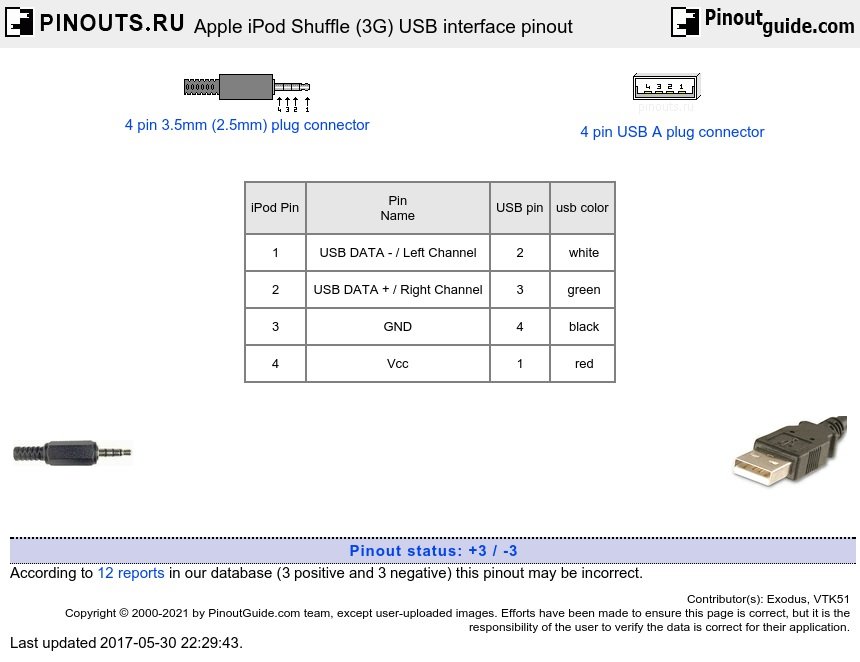
This is the cornerstone of your Shuffle’s existence. The 3G model uses a specific, short USB-to-3.5mm jack cable. It looks like a standard headphone plug on one end and a USB-A on the other. This single cable handles both charging and data transfer.
- What to Look For: Original Apple cables are ideal, but compatible third-party options exist. Ensure they are explicitly labeled for the iPod Shuffle 3G (sometimes referred to as the "clip-style" Shuffle). Generic USB cables won't work.
- Why It's Critical: Without this unique cable, you cannot charge your device or sync new music. If yours is lost or damaged, finding a reliable replacement should be your top priority.
Wall Adapters: Efficient Power Delivery
While you can charge your Shuffle by plugging its USB cable into a computer, a dedicated wall adapter offers faster, more consistent charging without needing your computer to be on.
- Specs to Note: The iPod Shuffle draws very little power. Any standard 5W (5V/1A) USB wall adapter will suffice. You likely have several of these lying around from old iPhones or other small electronics.
- Avoid Overkill: While modern fast chargers (like those for iPads or newer phones) might technically work, they offer no benefit to the Shuffle and could, in rare cases, generate unnecessary heat. Stick to standard 5W chargers.
Car Chargers: Music on the Move
For road trips or daily commutes, a car charger can be invaluable.
- Compatibility: Simply use your Shuffle's USB cable with any standard car charger that has a USB-A port. Most modern cars have these built-in, or you can use a cigarette lighter adapter with a USB port.
- Convenience: Ensures your Shuffle is always topped up before you reach your destination, ready for your next adventure.
Portable Power Banks: Uninterrupted Sound Anywhere
For adventurers, campers, or simply long days away from an outlet, a power bank is a godsend.
- Small Capacity is Fine: The Shuffle's battery is tiny, so even a small, pocket-sized power bank can charge it multiple times over.
- Charge While Listening: Many power banks allow pass-through charging, meaning you can plug your Shuffle into the power bank, and the power bank into a wall outlet, effectively turning the power bank into a buffer for stable charging.
The Sound Experience: Headphones and Audio Adapters
This is where the iPod Shuffle 3G truly differentiates itself. Its control scheme dictates specific headphone requirements.
The Critical Role of Inline Remote Headphones
The Shuffle 3G has no physical buttons for play/pause, volume, or track skipping on the device itself. All these functions are controlled via an inline remote on the headphone cable.
- Apple Earphones with Remote: The original solution. These provide full control functionality and are still prized among 3G Shuffle owners. Finding genuine ones in good condition can be a challenge.
- Third-Party Compatible Headphones: Several manufacturers produced headphones specifically designed to be compatible with the iPod Shuffle 3G's remote controls. Look for headphones explicitly stating "iPod Shuffle 3rd Gen compatible" or "Made for iPod Shuffle with remote."
- Inline Remote Adapters: If you love your current headphones but they lack an inline remote, you might be able to find a separate adapter. These small dongles plug into the Shuffle's headphone jack, providing the necessary remote controls, and then your standard headphones plug into the adapter. This is an excellent workaround for using premium headphones with your 3G Shuffle.
FM Transmitters: Broadcasting Your Tunes
For those who want to play their Shuffle through older car stereos or home systems that lack an auxiliary input or Bluetooth, an FM transmitter can bridge the gap.
- How They Work: These devices plug into the Shuffle's headphone jack and broadcast your music on a vacant FM radio frequency, which you then tune into on your stereo.
- Considerations: Quality can vary, and interference can be an issue in densely populated areas. However, for a simple, wireless connection to legacy systems, they remain a viable option.
Protection & Portability: Keeping Your Shuffle Safe
The Shuffle's minimalist design and clip make it incredibly portable but also susceptible to bumps, scratches, and even loss.
Cases: Your First Line of Defense
A good case can protect your Shuffle from everyday wear and tear.
- Silicone Cases: Offer basic scratch protection and a bit of shock absorption. They also add grip, making the tiny device less prone to slipping from your fingers.
- Hard Plastic Cases: Provide more rigid protection against impacts. Some come with their own integrated clips, which can be useful if the original clip breaks.
- Armbands: Ideal for runners and gym-goers. These secure your Shuffle to your arm, keeping it out of the way while you exercise. Many armbands also have a clear screen protector (for devices that have screens, but it still protects the body) and access points for the headphone jack.
Carrying Clips and Lanyards
The built-in clip is a defining feature of the Shuffle 3G, but over time, it can become loose or even break.
- Replacement Clips: If your original clip is failing, you might find third-party cases or accessories that offer a more robust clipping mechanism.
- Lanyards: For those who prefer to wear their Shuffle around their neck or wrist, a lanyard can be a simple, secure solution, especially if your case has a lanyard loop.
Data & Management: Keeping Your Music Fresh
The iPod Shuffle 3G relies entirely on iTunes (or Finder on macOS Catalina and later) for music management and essential functionality.
iTunes/Finder: Your Digital Music Hub
This software is non-negotiable for loading music onto your Shuffle.
- iTunes (Windows & Older macOS): You’ll need a compatible version of iTunes to sync music, manage playlists, and update VoiceOver languages. Ensure your iTunes library is organized and your Shuffle is set to sync selected playlists or your entire library.
- Finder (macOS Catalina and Newer): On modern Macs, iTunes has been replaced by Finder for device management. Your Shuffle will appear in the sidebar, allowing you to drag and drop music, podcasts, and manage settings just as you would in iTunes.
- VoiceOver Management: Crucially, iTunes/Finder is also where you manage the VoiceOver feature. This text-to-speech function announces song titles, artists, and playlist names, which is essential given the Shuffle's screenless design. Ensure you have the VoiceOver kit installed and your preferred languages downloaded.
Extending Its Lifespan: Critical Maintenance Practices
An iPod Shuffle 3G is a vintage piece of tech. With careful maintenance, you can significantly prolong its life.
Battery Health: The Heart of the Matter
The built-in lithium-ion battery is the most common point of failure for older devices.
- Charge Regularly, Don't Deep Discharge: Avoid letting the battery completely drain to 0% often. Lithium-ion batteries prefer to be topped up frequently rather than fully discharged.
- Avoid Overcharging: Once fully charged, it's generally safe to leave it plugged in for a short period, but consistently leaving it on a charger for days on end isn't ideal for long-term health. The charging circuit should stop charging once full, but prolonged heat can be detrimental.
- Storage Tips: If storing your Shuffle for an extended period, charge it to about 50-70% first. Storing a fully drained or fully charged lithium-ion battery for months can degrade it faster. Store it in a cool, dry place.
- Temperature Matters: Extreme hot or cold temperatures are detrimental to battery health. Avoid leaving your Shuffle in a hot car or direct sunlight.
Physical Cleanliness: Keeping it Pristine
Regular cleaning prevents dirt and grime from affecting performance.
- The Body: Use a soft, lint-free cloth (like a microfiber cloth) to wipe down the Shuffle's aluminum body. For stubborn smudges, slightly dampen the cloth with water or an electronics cleaner.
- Headphone Jack: This is a crucial area. Dust and lint can accumulate, causing intermittent audio or charging issues. Use a can of compressed air to carefully blow out the jack. A clean, dry cotton swab (Q-tip) can also be gently twisted inside, but be careful not to leave cotton fibers behind.
- USB Cable Contacts: Ensure the metal contacts on your USB cable are clean and free of corrosion.
- The Clip: Keep the clip mechanism free of debris. If it feels stiff, a tiny drop of silicone lubricant might help, but proceed with caution.
Software Health: Keeping it Running Smoothly
While the Shuffle 3G doesn't receive new software features, its firmware still benefits from occasional attention.
- Firmware Updates (Historical): While Apple no longer releases updates for this device, ensure you ran all available updates when it was supported. If you're encountering issues, sometimes restoring the device through iTunes/Finder can resolve software glitches.
- Restoring the Device: In iTunes/Finder, you have the option to "Restore iPod." This will erase all content and settings, reinstall the latest compatible firmware, and return the Shuffle to its factory state. It's often the first step in troubleshooting persistent software problems. Remember to back up your music library on your computer first!
Storage Best Practices: Don't Overfill
While it's tempting to cram every available megabyte onto your Shuffle, leaving a little breathing room can contribute to smoother operation.
- Leave Some Space: Aim to leave about 10-15% of the storage capacity free. This can help with file indexing and overall performance, though less critical on simpler devices like the Shuffle compared to, say, a smartphone.
Common Troubles and Quick Fixes
Even with the best care, you might encounter issues. Here are some common problems and their solutions.
- My Shuffle isn't charging/not recognized by my computer:
- Check the Cable: The specialized USB cable is often the culprit. Try a different, known-good cable if you have one.
- Clean Ports: Gently clean the headphone jack on the Shuffle and the USB port on your computer.
- Try Another USB Port/Computer: Rule out a faulty port on your computer.
- Restart Computer: Sometimes a simple reboot can resolve connectivity issues.
- Update iTunes/Finder: Ensure your music management software is the latest version.
- Headphone remote isn't working:
- Check Headphones: Test with another pair of Shuffle 3G-compatible headphones to see if the issue is with the headphones themselves.
- Clean Headphone Jack: Dust and lint can interfere with the remote's signals.
- Reset Shuffle: Unplug everything, let it sit for a minute, then reconnect.
- VoiceOver isn't working or sounds garbled:
- Re-sync VoiceOver Kit: In iTunes/Finder, navigate to your Shuffle's settings and try re-syncing the VoiceOver languages. You might need to uncheck and re-check the VoiceOver option.
- Check Language Files: Ensure the necessary language files for VoiceOver are installed in iTunes/Finder.
- Music skipping or playing erratically:
- Restore Shuffle: This is often the most effective solution for playback issues, as it reinitializes the device's software.
- Check Music Files: Ensure the source music files on your computer are not corrupted.
The Legacy Device Mindset: What to Expect
Operating an iPod Shuffle 3G today means embracing its status as a vintage tech item.
- Accessory Availability: While some original accessories might be scarce, a vibrant market for compatible third-party and refurbished items still exists online. Websites like Amazon and eBay are good places to start your search for iPod Shuffle 3G chargers, cases, or compatible headphones.
- Battery Life: Even with the best care, the battery life of an old Shuffle will likely be less than when it was new. Manage your expectations and lean on portable power solutions.
- Software Updates: There will be no new features or security updates. Its functionality is fixed.
- Embrace the Simplicity: The 3G Shuffle excels at one thing: playing music in a distraction-free, incredibly portable package. Cherish it for what it is.
Keeping the Music Playing: Your iPod Shuffle 3G Journey
Your iPod Shuffle 3rd Generation is more than just an old MP3 player; it's a testament to minimalist design and a commitment to focused listening. By investing in the right accessories and committing to simple, consistent maintenance, you're not just preserving a gadget—you're preserving a piece of personal audio history. So go ahead, clip it on, load your favorite tunes, and enjoy the pure, unadulterated sound experience your well-cared-for Shuffle continues to deliver.