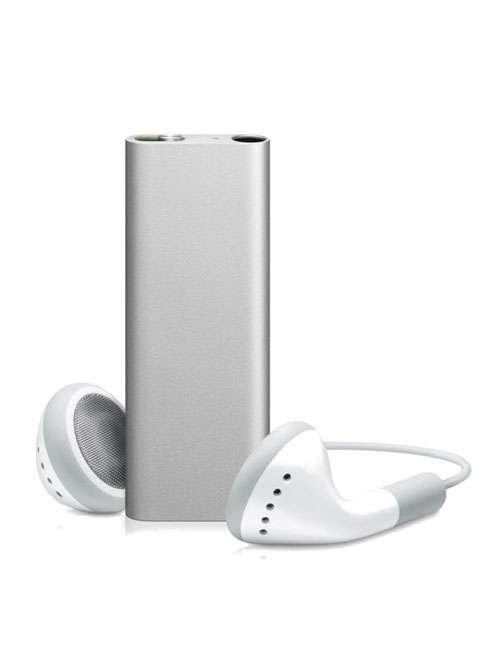
The iPod Shuffle once epitomized compact music on the go. But among its four distinct iterations, one model stands out for its sheer audacity in design: the third generation. If you're keen on comparing the iPod Shuffle 3rd Gen to other iPod models, you're diving into a fascinating chapter of minimalist tech, where Apple gambled big on simplicity and almost lost its shirt.
This isn't just about specs; it's about philosophy. The 3rd Gen Shuffle dared to remove all physical playback controls from the device itself, a bold move that drew both fervent praise and sharp criticism. Let's peel back the layers on this unique experiment and see how it stacks up against its more conventional siblings.
At a Glance: Why the 3rd Gen Shuffle Stands Out
- Radical Minimalism: It’s the only iPod Shuffle (and perhaps the only iPod ever) to entirely eliminate on-device playback buttons.
- Headphone Dependent: All control — play, pause, volume, skip tracks — was relegated to a remote built into the headphone cable.
- VoiceOver Pioneer: Introduced VoiceOver, a clever feature that verbally announced track titles and artist names.
- Smallest Footprint: Even tinier than previous models, resembling a sophisticated, anodized paperclip.
- A Brief Experiment: Its unique design lasted only a single generation before Apple reverted to physical buttons.
- Discontinued Legacy: Like all Shuffles, it was part of the line discontinued by Apple on July 27, 2017.
The Rise and Fall of a Minimalist Marvel: A Brief Shuffle History
The iPod Shuffle line, known for its tiny form factor, affordability, and singular purpose (shuffling music), spanned over a decade, proving that sometimes, less truly is more. From its inception in 2005 to its discontinuation in 2017, the Shuffle was the ultimate grab-and-go music player, free from the distractions of screens and complex menus. It was perfect for workouts, commutes, or simply when you wanted a soundtrack without needing a full-blown smartphone.
However, despite its charm, the line wasn't without its quirks. A common issue across all models, often surfacing years into their lifespan, involved aging lithium-ion batteries. These could expand, warping the tight unibody case and potentially detaching the iconic click wheel or control panel. This fragility is a key consideration for anyone still using or collecting these devices today.
Let's take a closer look at each iteration to understand the evolutionary path that led to, and then away from, the 3rd Gen's controversial design.
Generation by Generation: The Shuffle's Evolutionary Journey
Each iPod Shuffle generation represented Apple's ongoing quest for ultimate portability and user-friendliness, albeit with varying degrees of success.
The Original Vision: iPod Shuffle 1st Gen (2005-2006)
Released in 2005, the first iPod Shuffle made a splash by abandoning screens entirely. It was a white, rectangular "USB stick" with a cap, built-in USB 2.0 port, and a rather prominent circular control pad on its face. This allowed for basic play/pause, volume, and track navigation right on the device.
It was powered by a SigmaTel processor, uniquely did not run iPod Software (unlike other non-iOS iPods), and offered 512MB or 1GB of storage, delivering up to 12 hours of battery life. It supported standard audio formats like AAC, MP3, AIFF, WAV, and Audible. Simple, effective, and truly groundbreaking in its minimalism, it set the stage for a new category of music players.
Clipping On: iPod Shuffle 2nd Gen (2006-2009)
The second generation, launched in 2006, marked a significant design departure. Apple ditched the "USB stick" and embraced a tiny, anodized aluminum rectangle with a built-in belt clip. This instantly made it more wearable and convenient for active users. Its USB connection shifted to an included adapter that plugged into the 3.5mm headphone jack, a design choice that would persist.
Functionally, it refined the interface with a rectangular control panel featuring a shuffle switch, volume buttons, and a central play/pause button. It also added support for audiobooks and podcasts. Available with 1GB or 2GB of storage, it maintained the 12-hour battery life and continued to support the same audio formats as its predecessor. This model became wildly popular, solidifying the Shuffle's place in Apple's lineup.
The Bold Experiment: iPod Shuffle 3rd Gen (2009-2010)
Then came the third generation in 2009, a radical rethinking of the Shuffle's core identity. This is the model we're here to scrutinize. Returning to a tall, narrow form factor reminiscent of the first generation, it retained the clip but became astonishingly small. Its headline feature, however, was the complete elimination of all physical buttons on the device itself.
VoiceOver: A Necessary Innovation
To compensate for the lack of on-device controls, Apple introduced VoiceOver technology. With a press of a button on the headphone remote, VoiceOver would announce the track title and artist name via text-to-speech, pre-generated by iTunes during syncing. This ingenious workaround allowed users to navigate their music without a screen.
The USB connection, like the 2nd Gen, was via the 3.5mm headphone jack. Storage options were 2GB or 4GB, with battery life rated at approximately 10 hours. It supported the usual array of audio formats. This extreme minimalist approach meant control was entirely dependent on special headphones with an inline remote. This specific model holds a unique, albeit sometimes controversial, place in Apple's history. For a deeper dive into this specific model, explore our comprehensive guide to the 3rd generation iPod shuffle.
A Return to Form: iPod Shuffle 4th Gen (2010-2017)
The market's reaction to the 3rd Gen's buttonless design wasn't universally positive. Many users missed the tactile feedback of on-device controls. Recognizing this, Apple pivoted with the fourth generation, released in 2010. This model saw a return to the compact, square design of the second generation, critically reintroducing physical buttons directly on the device.
It kept the popular VoiceOver functionality and offered 2GB or 4GB of storage initially (later models standardized on 2GB). Battery life saw an improvement, with initial models boasting up to 15 hours, though later revisions in 2017 slightly reduced this to around 12 hours. While the initial 4th Gen supported a broad range of audio formats, later revisions in 2012 streamlined this to primarily AAC and MP3, reflecting changing usage patterns. The 4th Gen remained on the market until the Shuffle line was finally discontinued.
Direct Comparison: Where the 3rd Gen Diverged (and Why it Mattered)
The 3rd generation iPod Shuffle wasn't just another iteration; it was a philosophical statement, pushing the boundaries of what "minimalist" could mean for consumer electronics. But this radical shift came with both distinct advantages and notable drawbacks when stacked against its siblings.
User Interface: Buttonless vs. On-Device Tactility
This is the biggest differentiator.
- 1st, 2nd, and 4th Gen: All featured physical buttons directly on the device. The 1st Gen had a central click wheel, while the 2nd and 4th Gen had a more compact, integrated button panel. This meant you could control your music regardless of your headphones.
- 3rd Gen: Its slick, buttonless casing was aesthetically pleasing but functionally reliant. All controls—play/pause, volume, track skip—were integrated into a remote on the headphone cable. This design choice, while clean, created an immediate dependency on specific (and often proprietary) headphones. If your headphones broke, or if you preferred a different pair, you lost functionality.
Design & Portability: The Ultimate Shrink-Down
- 1st Gen: Resembled a thick USB stick, larger than subsequent models.
- 2nd & 4th Gen: Both adopted a tiny, square-ish design with an integrated clip, highly portable.
- 3rd Gen: Even smaller and sleeker than the 2nd and 4th Gens, taking on a tall, narrow form factor like a high-tech paperclip. It felt incredibly light and unobtrusive when clipped on. Its sheer tininess was a marvel of engineering.
VoiceOver Technology: A Lifesaver for the Screenless
- 3rd Gen: Pioneered VoiceOver, a critical innovation that allowed the device to announce track and artist names aloud. Without a screen, this was the only way to know what was playing.
- 4th Gen: Wisely retained VoiceOver, pairing it with the reintroduction of physical buttons, offering the best of both worlds.
- 1st & 2nd Gen: Pre-date VoiceOver, meaning you had no idea what song was playing unless you listened to the beginning.
Battery Life & Storage: Incremental Improvements
Across the generations, storage options expanded, and battery life saw some fluctuations.
| Generation | Storage Options | Battery Life (Approx.) |
|---|---|---|
| 1st Gen | 512MB, 1GB | 12 hours |
| 2nd Gen | 1GB, 2GB | 12 hours |
| 3rd Gen | 2GB, 4GB | 10 hours |
| 4th Gen | 2GB, 4GB (later 2GB only) | 12-15 hours |
| The 3rd Gen saw a slight dip in battery life compared to its direct predecessor and successor, possibly due to the demands of its compact design and VoiceOver processing. However, it offered the highest storage capacity at the time of its release. |
Audio Format Support: Broadly Consistent
All Shuffle generations supported core audio formats like AAC, MP3, AIFF, WAV, and Audible. The 4th Gen's later revisions did streamline support to mainly AAC and MP3, but for most users, this wasn't a significant limitation. The 3rd Gen was fully capable of playing back your iTunes library.
Accessory Dependency: The 3rd Gen's Achilles' Heel
This is where the 3rd Gen truly stood apart, and not always for the better. Its complete reliance on inline headphone remotes meant:
- Proprietary Control: You had to use Apple's headphones with a compatible remote, or certified third-party headphones. Standard headphones wouldn't give you control over playback or volume.
- Fragility: The headphone remote itself was a point of failure. If it broke, the entire functionality of your Shuffle was compromised.
- Cost: Replacing specialized headphones could be more expensive than generic ones.
This dependence made the 3rd Gen less versatile and more frustrating for users who preferred their own high-quality headphones or needed a quick, cheap replacement. It was a usability choice that ultimately backfired for many, leading to the 4th Gen's course correction.
Living with a 3rd Gen Shuffle Today: What You Need to Know
If you've rediscovered a 3rd Gen iPod Shuffle or are considering purchasing one, you'll encounter a few unique challenges that aren't present with other models.
The Headphone Hurdle: Finding Compatible Controls
This is the biggest obstacle. The 3rd Gen requires headphones with an Apple-compatible three-button remote to control volume, play/pause, and track skipping. Many standard 3.5mm headphones, even those with a single-button remote, simply won't work. You'll need to seek out:
- Original Apple EarPods (with remote): These are getting harder to find new, but used ones might surface.
- Licensed Third-Party Headphones: Brands like Sennheiser, Bose, or others sometimes produced models with Apple-compatible inline remotes.
- Remote Adapters: Some companies made small adapters that would allow you to plug any 3.5mm headphones into the Shuffle, providing the necessary controls. These are rare finds today.
Without these specific accessories, your 3rd Gen Shuffle is effectively a paperweight that only plays audio sequentially without any user control.
Battery Degradation: A Universal Shuffle Challenge
As mentioned, aging lithium-ion batteries are a universal issue for all iPod Shuffles. Years of charge cycles inevitably lead to reduced capacity. Furthermore, battery swelling can cause physical damage, warping the case and even detaching internal components.
- Expect Reduced Life: Even if a 3rd Gen Shuffle powers on, don't expect it to hit its original 10-hour battery life.
- Repair Difficulty: Due to their incredibly compact, unibody design, replacing the battery in any Shuffle is an extremely difficult task, often requiring specialized tools and a high risk of damaging the device. For most, it's not a practical repair.
Syncing & iTunes: Compatibility with Modern Systems
Fortunately, the core functionality of syncing music via iTunes remains relatively straightforward.
- iTunes/Music App: You'll need iTunes (on Windows) or the Music app (on macOS Catalina and later) to load music onto your Shuffle.
- USB Connection: The Shuffle connects via its 3.5mm headphone jack using a special USB cable provided by Apple. Ensure you have this cable, as generic 3.5mm cables won't work for data transfer.
- Format Compatibility: Stick to AAC or MP3 for the most reliable playback, though the 3rd Gen officially supports more.
Collector's Item or Daily Driver?
For most, the 3rd Gen iPod Shuffle is more of a collector's item or a novelty. Its unique design story and the specific challenges of its control scheme make it less ideal for everyday use compared to, say, a 4th Gen Shuffle or even a classic iPod Nano. However, for those who appreciate design risks and minimalist aesthetics, it holds a special allure.
Choosing Your Classic Shuffle: A Guide for Collectors and Enthusiasts
So, you're in the market for a vintage iPod Shuffle? Your choice depends heavily on your priorities.
- If you value seamless control and robust design: The 4th Generation Shuffle is generally considered the best all-rounder. It brings back on-device buttons, retains VoiceOver, offers good battery life, and its square design is highly practical. It's the most "modern" and user-friendly of the bunch.
- If you appreciate design innovation and extreme minimalism (and don't mind the headphone dependency): The 3rd Generation Shuffle is your pick. It's a conversation starter and a testament to Apple's willingness to experiment. Just be prepared to source compatible headphones or adapters. It's arguably the most unique collector's piece of the line.
- If you want classic simplicity with physical buttons: The 2nd Generation Shuffle offers a fantastic balance. Its compact clip-on design, simple control panel, and decent battery life make it a solid choice, especially if you can find one in good condition.
- If you're a purist and want the original experience: The 1st Generation Shuffle holds historical significance. Its "USB stick" design and basic controls are charmingly retro.
Pitfalls to Avoid: - Non-functional batteries: Assume any Shuffle you buy used will have a diminished battery. If it doesn't hold a charge at all, it's likely a brick.
- Missing cables/accessories: For the 2nd, 3rd, and 4th Gens, ensure the specific USB charging/syncing cable is included. For the 3rd Gen, verify the headphones or a control adapter are present.
- Physical damage: Check for case warping, especially around the control areas, which indicates battery swelling.
Frequently Asked Questions About the iPod Shuffle Lineup
Here are some common questions about the iPod Shuffle, particularly the 3rd Generation:
Why did the 3rd Gen Shuffle remove buttons?
Apple's aim was to achieve ultimate minimalism and a sleek, uninterrupted design. By offloading controls to the headphone remote, they made the device itself incredibly tiny and visually clean, prioritizing aesthetics and a new interaction paradigm.
Are iPod Shuffles still good?
Yes, for their intended purpose. If you want a simple, screenless device for music on the go, especially for exercise or travel where a phone might be too distracting or cumbersome, an iPod Shuffle is still a great option, provided you can overcome the battery and accessory challenges of older models.
How long did the iPod Shuffle last?
The iPod Shuffle product line ran for approximately 12 years, from its introduction in 2005 until its discontinuation on July 27, 2017. Each generation typically lasted between 1-4 years on the market before being updated or replaced.
What was the last iPod Shuffle model?
The fourth generation iPod Shuffle, released in 2010 (with minor revisions in 2012, 2015, and 2017), was the last model produced before the entire line was discontinued.
Can you use regular headphones with an iPod Shuffle 3rd Gen?
You can plug regular 3.5mm headphones into a 3rd Gen iPod Shuffle and hear audio, but you will not be able to control playback (play/pause, volume, skip tracks). For full control, you need headphones with an Apple-compatible inline remote or a special remote adapter.
The Shuffle's Legacy: A Testament to Focused Design
The iPod Shuffle, in all its forms, was a testament to focused design and Apple's belief in the power of simplicity. The 3rd generation, in particular, stands as a fascinating case study in pushing those boundaries, even if it meant sacrificing a bit of universal usability. It was a bold experiment that taught Apple (and the industry) valuable lessons about user expectations for physical controls.
While the iPod Shuffle era has passed, the line’s legacy endures as a reminder that sometimes, all you really need is your music, a sturdy clip, and the courage to just shuffle. If you're looking to dive into this piece of tech history, understanding the nuances of each generation, especially the distinct 3rd Gen, will help you appreciate the journey of portable music that much more. Go ahead, dust off that old Shuffle, or find one that calls to you, and embrace the simple joy of discovery.